
 EN
EN
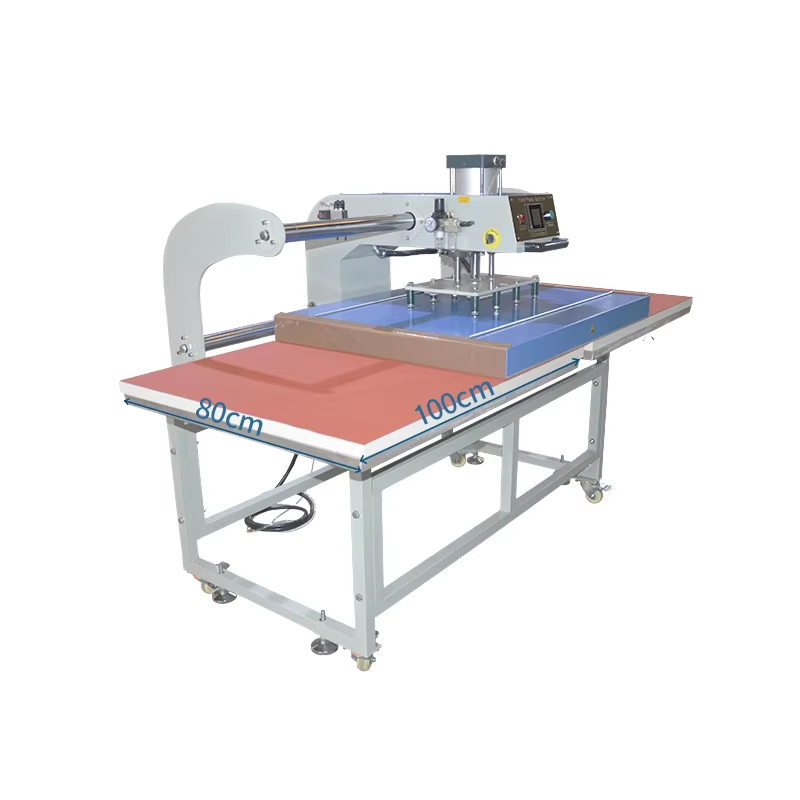
Mastering Core 80x100 Heat Press Machine Settings
Temperature Calibration for Polyester, Cotton, and Blends
Achieving consistent results with an 80x100 heat press machine starts with precise temperature calibration for your target substrates. Cotton typically requires a platen temperature of 350°F (177°C) with a 15-second dwell time, while polyester demands lower heat—around 305°F (152°C) for 10–12 seconds—to prevent scorching and dye migration. For cotton-polyester blends, split the difference: set the machine to 330°F (166°C) and test a sample before full production. Always pre-press cotton for 3–5 seconds to remove moisture, which improves adhesion; for blended fabrics, pre-press at the same temperature for 5 seconds to stabilize fibers. Regularly verify platen temperature using a surface probe—many large-format presses drift by ±10°F over months of use. A calibrated 80x100 heat press eliminates guesswork and ensures first-press success across material types.
Time and Pressure Optimization Using Material-Specific Profiles
After setting the right temperature, adjust press time and pressure to match each material’s thickness and coating. For 100% cotton, apply medium to firm pressure (40–50 PSI) for 15 seconds; extend to 20 seconds for layered or high-opacity designs to ensure full ink penetration. Polyester transfers best with lighter pressure (30–40 PSI) and shorter dwell (10–12 seconds) to avoid fiber melting. For blends, use medium pressure and 12–15 seconds, then peel hot or cold per transfer paper instructions. Save these parameters in your heat press’s memory slots—a standard feature on most 80x100 models—to switch between substrates instantly without manual reentry. Before launching production, test each new substrate batch with a 5-second strip press to confirm uniform pressure distribution across the full 80×100 cm platen. Consistent time and pressure reduce defects and accelerate large-format output.
Leveraging Full 80x100 Heat Press Machine Capacity Strategically
To get the most value from an 80x100 heat press machine, operators must shift from single-item pressing to sheet-level layout planning. The large platen (80 cm × 100 cm) offers about 8,000 cm² of transfer area—but real-world yields depend on how efficiently that space is used and how evenly the platen applies heat and pressure across its surface.
Maximizing Yield with Nested Layouts and Bleed-Aware Placement
Arrange multiple designs on one transfer sheet by nesting them—rotating or mirroring elements to fill gaps. Use vector-based nesting software to automatically compute the tightest possible arrangement, often increasing yield by 15–20% compared to manual placement. Always leave 2–3 mm between adjacent images to prevent crossover transfers, and extend artwork bleeds 3–5 mm beyond the cut line so trimming errors don’t expose white edges. Test the layout on inexpensive paper first to confirm registration before committing to heat-transfer vinyl or sublimation paper.
Avoiding Edge Distortion: The 5 cm Safe-Zone Rule
Heat plates often produce slightly lower temperatures and uneven pressure near the perimeter due to thermal sag and platen flex. To guarantee uniform adhesion, keep all critical image content at least 5 cm from every edge of the platen. This “5 cm safe-zone” ensures the pressing elements receive the full, consistent heat and pressure the machine was designed to deliver. For oversized garments or rigid substrates requiring coverage beyond this zone, rotate the material 180° and re-press—but recognize that productivity declines with each additional cycle.
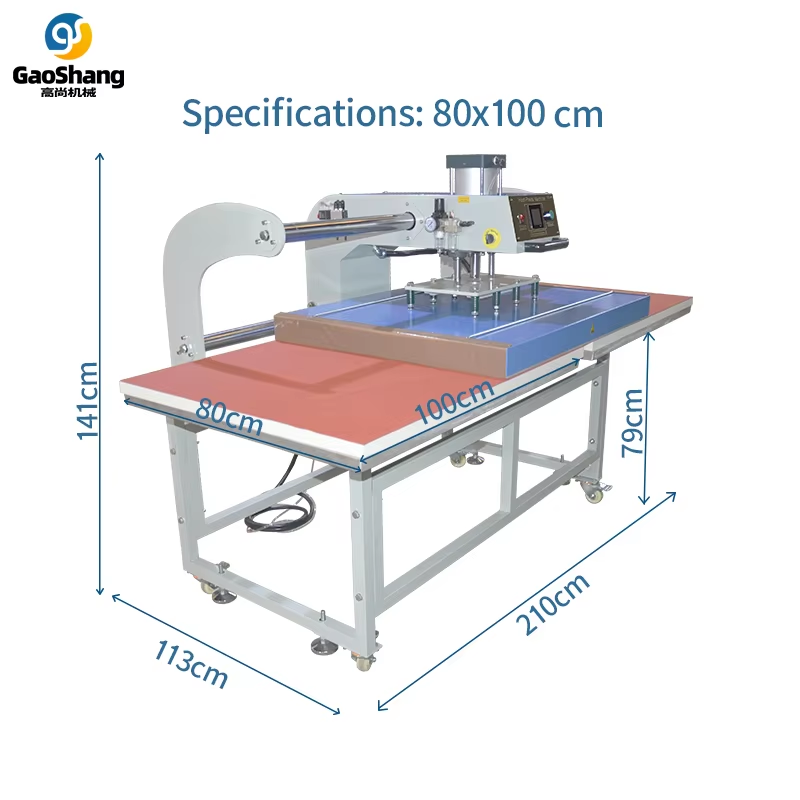
Integrating the 80x100 Heat Press Machine into High-Volume Production Workflows
Pre-Press Prep: Preheating, Substrate Testing, and Registration Jigs
Systematic pre-press preparation is critical for maintaining throughput without sacrificing quality. Start by preheating the 80x100 heat press for at least 10 minutes—this stabilizes platen temperature across its entire surface and minimizes cold spots that cause inconsistent adhesion. Next, test each new batch of substrate—whether cotton, polyester, or blend—for shrinkage and dye migration under your planned settings, and record findings in a material-specific profile. Finally, install or verify registration jigs on the lower platen. These physical guides let operators load garments and transfers in the exact same position every cycle, eliminating shifting and misalignment. Investing five minutes in these steps before a production run can cut defect rates by up to 30% and sustain peak line speed.
Diagnosing and Resolving Common 80x100 Heat Press Machine Output Defects
Ghosting, Peeling, and Color Migration — Root-Cause Mapping
Ghosting typically stems from substrate movement during the pressing cycle. Secure materials with heat-resistant tape and confirm the platen locks firmly. Peeling indicates insufficient heat or pressure for the given substrate—raise temperature by 5°C or extend dwell by 5–10 seconds, then retest on a sample. Color migration in dye-sublimation prints signals overheating beyond the fabric’s tolerance; lower the temperature by 10°C and verify platen surface temperature with an infrared thermometer. For recurring defects, inspect the machine for cold spots or uneven pressure using a pressure-test sheet. Logging each defect against its root cause enables systematic adjustment—reducing waste and improving output consistency across high-volume runs.
FAQ
What is the optimal temperature setting for polyester fabrics?
The optimal temperature for polyester is approximately 305°F (152°C) with a dwell time of 10–12 seconds to prevent dye migration and scorching.
How can I ensure consistent heat and pressure distribution on my 80x100 heat press machine?
Regularly test the platen with a surface probe and a pressure-test sheet to check for cold spots and uneven pressure. Adjust settings and maintain your machine to ensure uniform output.
What is the 5 cm safe-zone rule?
This rule ensures uniform adhesion by keeping all critical content at least 5 cm away from the edges of the platen, where heat and pressure may be inconsistent.
How do I handle oversized garments on an 80x100 heat press?
Rotate the garment 180° and re-press the design. However, keep in mind that productivity may decline with each additional cycle.
What causes ghosting, and how can I prevent it?
Ghosting occurs due to substrate movement during pressing. Secure materials with heat-resistant tape and ensure the platen locks firmly to prevent shifting.

